
How Is AI Changing Document Management
How Is AI Changing Document Management
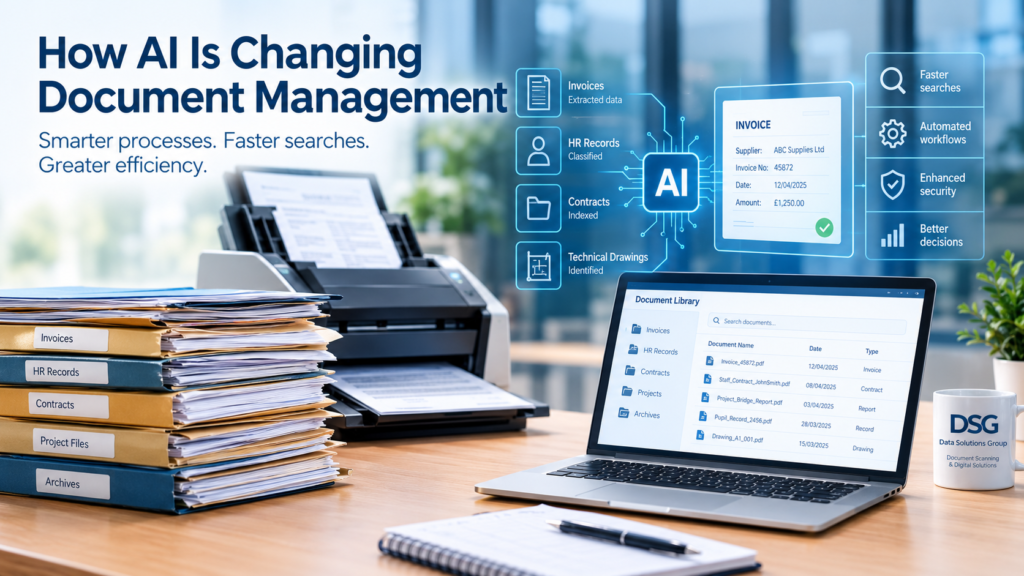
Artificial intelligence (AI) is changing the way businesses store, process and manage information. From automatically extracting data from invoices to making thousands of scanned documents searchable in seconds, AI is helping organisations work more efficiently while reducing the time spent handling paperwork.
For businesses that still rely on paper files, archived records and traditional document storage, these developments present an important opportunity. By combining document scanning, digital archiving and AI-powered technology, organisations can make their information easier to access, manage and protect.
At Data Solutions Group, we help businesses move away from paper-based processes by converting physical records into organised digital files. As AI continues to develop, high-quality digital documents are becoming an increasingly valuable foundation for smarter document management.
How Is AI Changing Document Management
What Is AI-Powered Document Management?
AI-powered document management uses artificial intelligence to help organisations process, classify, search and extract information from documents.
Traditional document management systems generally rely on users to name files, enter information manually and organise records into folders. Although these methods can work, they become time-consuming when businesses manage thousands of documents.
AI can help automate many of these activities.
For example, an AI-enabled system may be able to identify an invoice, recognise the supplier's name, extract the invoice number and date, and direct the document into the appropriate digital folder. Similarly, it may help identify contracts, personnel records, purchase orders and technical documents.
Depending on the technology used, these capabilities can reduce manual data entry, improve retrieval times and make business information more accessible.
However, the results depend on document quality, the software being used and the complexity of the information. Human checks remain important, particularly where accuracy has legal, financial or operational consequences.
1. Turning Paper Documents into Searchable Digital Information
One of the biggest barriers to adopting AI is the continued reliance on paper records.
Although AI tools can analyse digital information, they cannot automatically make an entire filing room searchable simply because the documents exist. Paper records must first be converted into a suitable digital format.
This is where professional document scanning plays an important role.
By scanning paper documents and applying Optical Character Recognition (OCR), businesses can create searchable PDFs. OCR converts printed text within an image into machine-readable text, allowing users to search for words, reference numbers and other information.
Once documents have been digitised, suitable AI tools can potentially help organisations:
- Identify relevant information within large document collections.
- Locate records using natural-language questions.
- Extract key information from invoices, contracts and reports.
- Classify documents according to their content.
- Summarise lengthy reports and correspondence.
- Identify relationships between documents.
The quality of the original paperwork and the scanning process matters. Faint text, handwritten notes, damaged pages and unusual layouts can affect recognition accuracy.
Therefore, businesses looking to introduce AI should consider digitisation a foundational step rather than an afterthought.
At Data Solutions Group, we convert paper records into digital files that can be searched, organised and accessed more easily. This helps businesses prepare their information for modern document management systems and future automation opportunities.
2. Faster Document Searches and Retrieval
Finding a particular document in a filing cabinet can take several minutes. Locating the same record within thousands of archived files can take considerably longer, particularly when the original filing structure is inconsistent.
AI-powered search is changing this process.
Traditional searches usually depend on filenames, folder structures or specific keywords. More advanced systems can use document content and, where supported, semantic search to identify information based on meaning rather than exact wording.
For example, an employee searching for information about a previous maintenance project might ask a suitable AI-enabled system to find reports relating to a particular machine, supplier or fault.
Rather than opening numerous files individually, the system may identify relevant documents and provide summaries or references to the source material.
This can be particularly valuable for:
- Engineering companies managing technical drawings and project records.
- Accountancy departments searching historic invoices and financial documents.
- HR teams retrieving personnel files and employment records.
- Healthcare organisations managing administrative paperwork.
- Legal and professional services firms handling contracts and correspondence.
- Schools and educational organisations maintaining pupil and staff records.
Nevertheless, AI-generated search results should be checked against the original documents when accuracy is important. Systems can overlook information or produce incorrect interpretations, so reliable source references and appropriate verification procedures remain essential.
3. Automating Manual Data Entry
Manual data entry is one of the most time-consuming aspects of document administration.
Invoices, purchase orders, delivery notes and application forms often contain similar information, yet employees may need to enter that information repeatedly into spreadsheets, databases or accounting systems.
AI can help reduce this workload by identifying relevant fields and extracting information automatically.
For example, an invoice-processing workflow might identify:
- Supplier name.
- Invoice number.
- Invoice date.
- Purchase order reference.
- Net amount and VAT.
- Total amount payable.
The extracted information can then be checked and transferred into another system, subject to the capabilities and configuration of the software.
This can help reduce repetitive work and improve processing speeds. However, businesses should not assume that automated extraction is always correct. Poor-quality scans, inconsistent layouts and ambiguous figures can cause errors.
A sensible approach is to automate routine documents while retaining human review for exceptions, unusual transactions and information that requires approval.
For organisations processing large volumes of historic paperwork, digitisation can be an important first step towards this type of automated workflow.
4. Improving Document Classification and Organisation
Many businesses accumulate years of paperwork without maintaining a consistent filing structure.
Documents may be stored in different departments, labelled inconsistently or filed under outdated reference numbers. As a result, employees may struggle to locate information even after it has been scanned.
AI can help classify documents according to their content and identify likely document types.
For instance, a system may recognise that a document is a purchase invoice rather than a delivery note. It might also identify a customer name, project reference or document date and suggest an appropriate filename or folder.
This can support more consistent document organisation and reduce the amount of manual sorting required.
However, classification rules should reflect the organisation's actual business requirements. Documents containing sensitive information may need additional checks before they are assigned to a particular folder or made available to users.
Good indexing remains important. Clear filenames, consistent reference numbers and a logical folder structure can make documents easier to retrieve, whether employees use traditional search tools or more advanced AI systems.
AI works best when the information it receives is well organised and the business has established clear rules for how records should be handled.
5. Helping Businesses Make Better Use of Archived Information
Archived documents often contain valuable information that is difficult to access.
Historical project files may record design decisions, previous maintenance work or technical specifications. Accounts records may provide evidence of past transactions, while personnel files may contain information needed for legitimate employment-related purposes.
When these records remain in boxes or filing cabinets, employees may not know what information exists until someone searches for it manually.
Digitisation can make the records more accessible. Once suitable documents have been scanned, indexed and processed using OCR, businesses may be able to use AI-enabled tools to explore their contents more efficiently.
Depending on the system, this could help employees locate previous project information, compare historic records or identify documents relevant to a particular enquiry.
However, AI should not be treated as a substitute for sound records management. Organisations still need to understand what they hold, who can access it, how long it should be retained and when it should be securely destroyed.
6. AI, Data Security and Confidentiality
Although AI offers significant opportunities, it also introduces important security and privacy considerations.
Business documents frequently contain confidential or personal information, including employee records, customer details, financial information and commercially sensitive material.
Before using AI to process these documents, organisations should consider how the technology handles their information.
Important questions include:
- Where will the documents and extracted data be stored?
- Who can access the information?
- Will the provider use submitted data to train its AI models?
- Are access controls and encryption appropriate?
- Can the organisation audit searches and user activity?
- How are information retention and deletion managed?
- Does the proposed use comply with applicable data protection requirements?
- Are there restrictions on transferring information outside the UK?
The answers will depend on the AI provider, the deployment model and the type of information involved.
For example, an organisation using an AI tool to analyse confidential HR records should assess the system's security, access permissions and contractual terms before uploading any files.
Businesses should also consider the UK GDPR and the Data Protection Act 2018 where applicable. Depending on the intended use, they may need to establish a lawful basis for processing, provide appropriate transparency, minimise the data used and carry out a Data Protection Impact Assessment.
AI-generated summaries and extracted information should also be handled carefully. They can contain inaccuracies, and employees should know when information needs to be checked against the original record.
The key principle is simple: making information easier to access must not mean making confidential information less secure.
7. Can AI Replace Traditional Document Management Systems?
AI is changing document management, but it does not remove the need for reliable storage, clear procedures and proper records administration.
A document management system still provides important functions, including:
- Controlled access to files.
- Version management.
- Folder structures and metadata.
- Retention and disposal rules.
- Audit trails.
- Document sharing and collaboration.
- Backup and recovery arrangements.
AI can add another layer of functionality by helping users search, classify, extract and interpret information.
For many organisations, the most effective solution will combine a well-managed digital archive with suitable document management software and carefully selected AI capabilities.
It is also important to distinguish between scanning, OCR and AI. Scanning creates a digital image of a paper document. OCR recognises text within that image. AI may then use the recognised text, document structure and other available information to perform more advanced tasks.
These technologies complement one another, but they are not interchangeable.
8. Why Document Scanning Still Matters in an AI-Driven World
As AI technology develops, businesses may be tempted to focus on software before considering the quality of their existing records.
However, AI is only as useful as the information it can access.
If important documents remain in filing cabinets, boxes or poorly organised archives, employees may struggle to use them in modern digital workflows.
Professional document scanning helps bridge this gap by converting paper records into digital information that can be stored, searched and processed.
A well-planned digitisation project can include:
- Secure collection and handling of original documents.
- Document preparation and scanning.
- Appropriate resolution and colour settings.
- OCR to make suitable documents searchable.
- Indexing and consistent file naming.
- Quality checks to identify scanning or processing problems.
- Secure electronic delivery.
- Agreed arrangements for retaining or confidentially destroying originals.
The precise requirements depend on the documents and how the organisation intends to use them.
For example, a company digitising engineering drawings may require large-format scanning and drawing-number indexing. An HR department may need individual personnel files named consistently, while an accounts team may prioritise invoice numbers, dates and supplier references.
Preparing these records properly can make it easier to introduce new document management technology later.
9. How Should Businesses Prepare for AI?
Organisations do not need to introduce every new AI tool immediately. A practical starting point is to understand their existing documents and identify where improved access or automation would provide the greatest benefit.
Consider the following steps.
Step 1: Review your current records
Identify where paper documents are stored, what types of records you hold and which documents employees retrieve most frequently.
Step 2: Prioritise suitable documents
Start with a manageable collection, such as accounts records, engineering files, HR documents or historic project paperwork. Consider confidentiality, retention requirements and the likely benefits of digitisation.
Step 3: Establish a consistent structure
Decide how files should be named, indexed and organised. Consistent metadata makes it easier for employees and digital systems to locate the right information.
Step 4: Digitise and apply OCR where appropriate
Convert paper records into suitable digital files. Check the quality of the scans and ensure that text recognition is appropriate for the document type.
Step 5: Select suitable technology
Assess document management and AI tools against your security requirements, existing systems, budget and intended use. Do not assume that every AI product offers the same search, extraction or security features.
Step 6: Test before wider implementation
Use a controlled pilot to check accuracy, retrieval times, access permissions and the handling of confidential information. Retain human oversight where mistakes could have significant consequences.
Step 7: Review the results
Measure whether the system saves time, improves retrieval or reduces repetitive administration. Use the results to decide whether to expand the project.
This measured approach helps organisations adopt useful technology without losing control of their information.
How Data Solutions Group Can Help
At Data Solutions Group, we help businesses and organisations convert paper-based records into organised digital information.
Our document scanning services support organisations that want to reduce their reliance on physical filing, improve document retrieval and prepare their archives for modern digital workflows.
We can help with a wide range of materials, including:
- General office documents and business correspondence.
- Accounts records, invoices and financial paperwork.
- HR files and personnel records.
- Engineering documents and technical drawings.
- Project files and historic business archives.
- Large-format drawings up to 42 inches wide.
- Other records requiring a tailored scanning and indexing approach.
Depending on your requirements, we can provide OCR, searchable PDFs, indexing and structured electronic delivery.
We also understand that archived documents may contain confidential business or personal information. Our handling and delivery arrangements can be tailored to the nature of the records and the agreed project requirements.
DSG works to relevant information security, quality and document management standards, including ISO 27001, ISO 9001:2015 and BS 10008. Please contact us if you require further details about our procedures and how they relate to your project.
Whether you are looking to digitise a few archive boxes or a substantial document collection, we can discuss your requirements and recommend a practical approach.
Final Thoughts: AI Starts with Accessible Information
AI is creating new opportunities to manage documents more efficiently. It can help businesses find information faster, automate repetitive tasks and make better use of historical records.
Nevertheless, these benefits depend on having accessible, well-organised and suitable digital information in the first place.
For organisations with substantial paper archives, professional document scanning can be an important first step towards modern document management.
By combining quality digitisation, consistent indexing, appropriate security and carefully selected AI tools, businesses can build a stronger foundation for the future.
Would you like to make your paper records easier to access and manage?
Contact Data Solutions Group to discuss your document scanning requirements and find out how we can help you move towards a more efficient digital document management system.
📞 Speak to Our Team Today
Ready to digitise your files?
📞 Call us on 01625 400250
📩 Or request a free consultation online
We help local authorities across the UK transform their archives into secure, efficient digital systems.
Data Solutions Group – Secure. Compliant. Trusted by Organisations Across the UK.